The public page is the passport as the customer reads it. It is served by your WordPress at the address the QR code encodes, and it is designed for the situation where it is opened: a phone, in a shop or at home, in the seconds after a scan.
What it shows
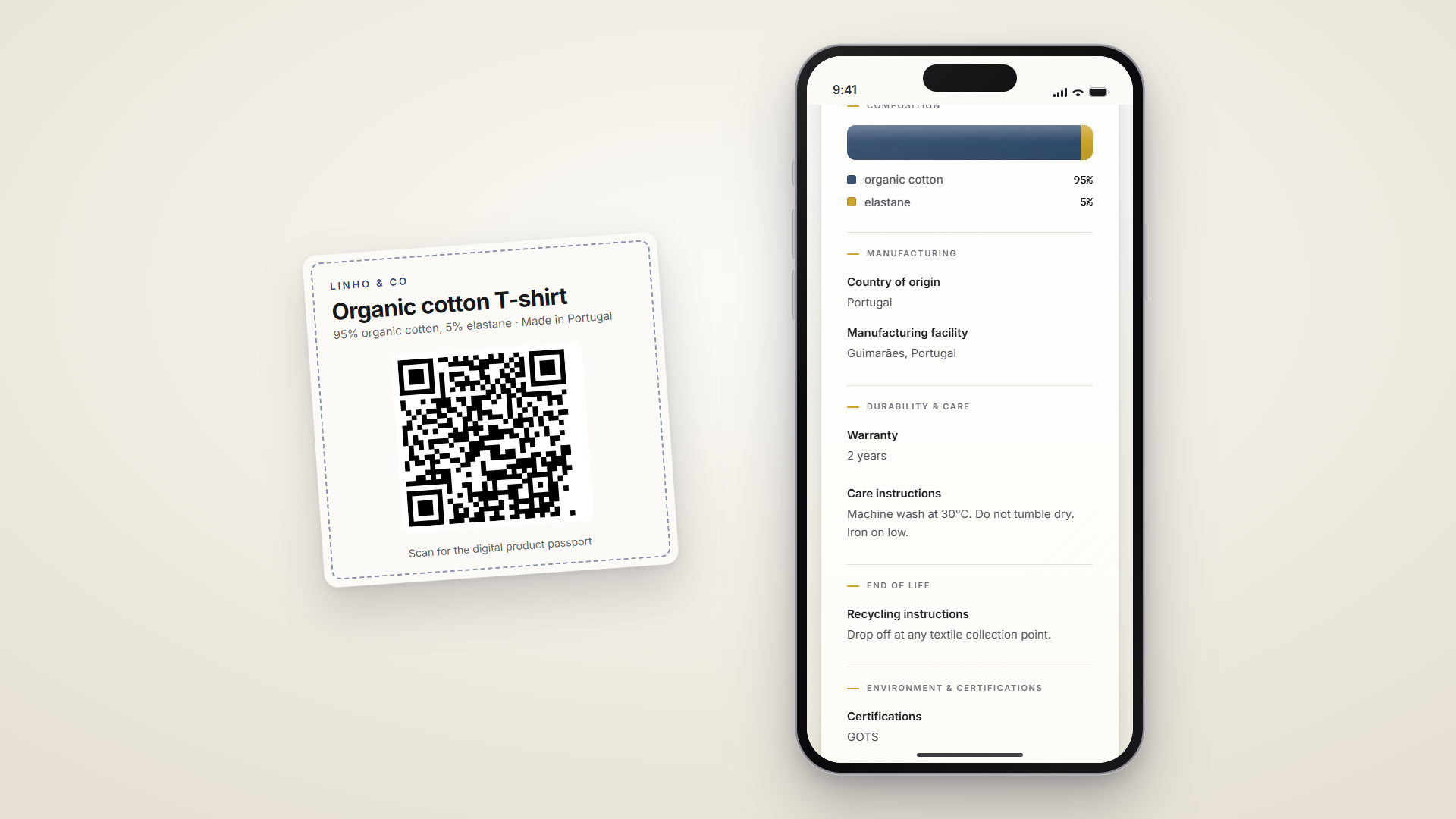
From top to bottom:
- The product: its photo as a thumbnail, its name, and the brand, which is your site's title as set under Settings, then General.
- The composition, as a bar whose segments are proportional to the percentages, with a legend. It is the signature element of the page and the first thing a customer looks for on a garment.
- The other groups of the template, in the order of the form: manufacturing, durability and care, end of life, environment and certifications. Only the filled fields appear, so an empty optional field leaves no gap and no heading; a group with nothing in it is skipped entirely.
- A footer with the date of the last update and the first characters of the passport identifier, so a customer service can match a page to a label.
Numbers, the carbon footprint for instance, are set in a monospaced face; everything else is prose and reads as such. Labels lead and values follow, on purpose: most of what a passport says is sentences, and a sentence in bold over a faint label reads worse than the reverse.
Served from your site, independent of your theme
The page is a standalone document, not a page of your theme. It loads its own style, two fonts shipped with the plugin and served from your domain, and no script at all apart from its structured data. There is no menu, no cookie banner, no tracking, and nothing for a customer to accept. It opens on any phone and weighs little, which matters on a shop's mobile network.
Because it is rendered by the plugin and not by the theme, changing or updating your theme never changes the page, and a theme's own scripts and styles never leak into it.
The page also survives the product. A passport is its own record: if the product is one day removed from the catalogue, the page keeps serving the passport data (without the product photo). A code printed on a label sold two years ago still answers.
Colour themes
Passports, then Passport page, chooses the page's colours. Three palettes ship with the plugin: Thread, the default indigo and gold, Graphite and Clay. The layout, the wording and the data are identical in every theme; only the ink changes. Saving applies the theme to every published passport at once, and the screen links to a passport to see the result.
The composition bar takes its colours from the theme too, and in every theme its segments stay distinguishable without colour, on a photocopy or for a colour-blind reader. That is a constraint of the bar, since it is a chart, and every palette is measured against it.
The Pro add-on extends this with more palettes, a brand colour of your own from which the whole page is derived, and your logo in place of the brand name.
Languages
The page is rendered in the language of the passport, which is the language of the market it is sold on. The labels of the page, "Country of origin", "Care instructions" and the others, exist in the 23 languages of the European Union and follow that language, whatever the language of your WordPress site. A shop in French selling in Spain does not need a Spanish WordPress to serve a Spanish label.
When a passport carries translations, which the Pro add-on writes, the page gains a language switcher at the top, each language has its own address, and the page declares the alternates so that search engines pair them.
Search engines
Each page carries schema.org structured data describing the product, with
its name, brand, image and the composition in words, in the same
application/ld+json block search engines read on any product page. The
page is indexable. Nothing here is required by the regulation; it is what
makes a passport findable by name.
Always current
The page is served without a cache lifetime: a browser that already opened it asks the site whether it changed before showing it again. A correction on a passport is therefore visible at the next scan, with no delay and no cache to purge. The same check covers the design of the page, so a plugin update reaches every passport at once.
What it never shows
No price, no stock, no order, no customer data. The page reads the passport and the product's name and image, nothing else, and it writes nothing. What you type in the passport form is exactly what a customer can read, and only that.
To see a page: View on a row of the passports list, the preview dialog on the products list, or the public link in the passport editor. Drafts have no page: their address answers 404 until they are published.