Composition is the field the regulation's known requirements put first for textile, and the one a store default fits worst: a brand rarely has one composition, but each of its categories usually does. All the T-shirts share a fibre mix, all the sweatshirts another. DPTag therefore keeps a composition on each product category, between the store default and the product itself.
Setting it
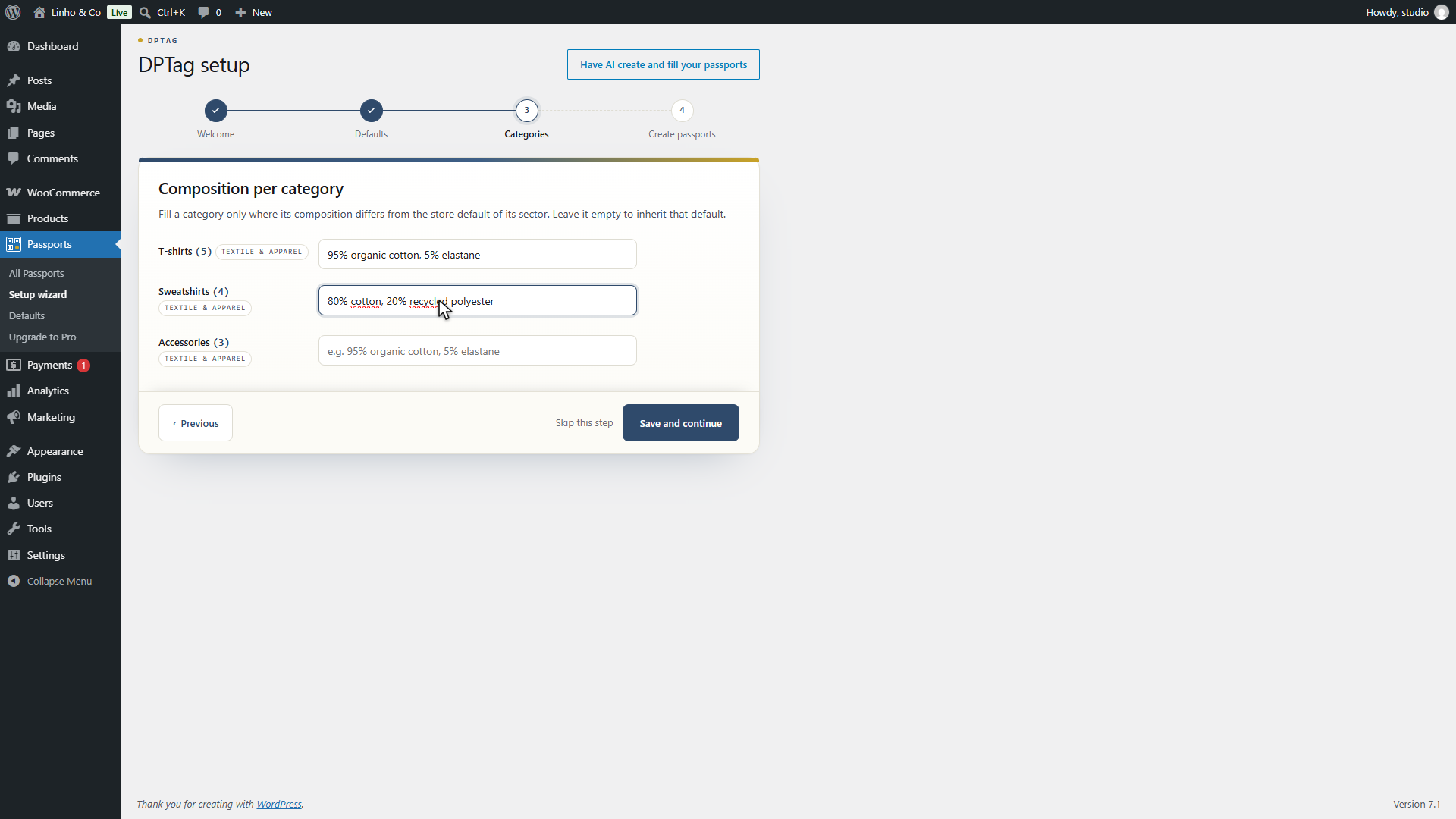
Category compositions are set in the setup wizard, step 3, which is reopened at any time from Passports, then Setup wizard. The step lists your largest categories by product count, one field each, with the store composition of the category's sector as a placeholder. Fill a row only where the composition differs from that placeholder; an empty row inherits it.
There is no composition field in WooCommerce's own category editor, on purpose: the wizard shows every category on one screen, which is how a composition is checked across a range, and a field buried in each category's edit form would not be.
The categories not shown, beyond the twelve largest, inherit the store default. Each category is attributed to the sector of most of its products, so a furniture category gets furniture materials and a textile one gets fibres.
How the text is read
Type the composition as it appears on a label. The parser accepts:
| You type | It reads |
|---|---|
95% organic cotton, 5% elastane | two materials, 95 and 5 |
Coton 95 %, élasthanne 5 % | the same, name first, French, accents kept |
80% cotton / 20% recycled polyester | separators can be commas, semicolons or slashes |
52.5% wool, 47.5% silk | decimals, with a point or a comma |
Both orders work, percentage first or name first, in English or French, and the material names are kept exactly as typed, which is what appears on the public page. A part without a percentage, or with a percentage of zero or above one hundred, is dropped. The text is parsed when a passport is created, not when it is saved on the category, so a composition typed in a form the parser does not read shows up as an empty composition on the new passports rather than as an error at save time. Checking one passport after a wizard run is the quickest way to confirm the text was read as intended.
On a passport
On the passport form, the composition group holds a list of materials, one row per material with a name and a percentage, a + Add material button and a running Total. The total updates as you type and turns green at exactly 100%, amber otherwise. The fibre bar drawn above the list follows the rows.
The plugin does not refuse to save a total other than 100%, since a passport is often edited in several sittings. But a composition that does not add up is visibly wrong on the public page, where the bar is drawn from these percentages, so bring the total to 100% before publishing.
Rows with no name or a zero percentage are dropped on save. A percentage above one hundred is capped at one hundred.
Where a passport's composition comes from
When a passport is created, its composition is the first of these that exists:
- A product attribute named Composition, Material, Fabric or one of their French equivalents, parsed with the same rules. See product attributes.
- The composition of the product's category, from the wizard.
- The store default composition of the product's sector.
After creation, the passport holds its own rows. Changing the category composition later applies to passports created from then on; existing ones keep theirs.
The composition is a required field of the textile template, so a passport without one cannot reach a 100% completeness score.